Review Bonuses Mobile App Sign Up

WooCasino App β€” Mobile Casino for Canadian Players

The WooCasino app is not a traditional download from the App Store or Google Play. The platform uses a Progressive Web App (PWA) model β€” a browser-based technology that installs directly from the website and behaves like a native app once set up. For Android users, that means a home screen shortcut with a full-screen experience. For iPhone users, the site is fully optimised for mobile Safari without a formal installation step.

10 free spins on Android install Β· 19+ Β· T&Cs apply

What Is a PWA and Why Does WooCasino Use One?

A Progressive Web App operates through the browser rather than through an app store. The practical difference for most players is that there is no approval process, no update downloads from a store, and no dependency on Apple or Google's policies on gambling apps. The casino can update the platform in real time without requiring users to manually install a new version.

The tradeoff is that iOS users do not get the full installation experience β€” the app does not sit in the iOS dock the same way an Android user's does. It still runs well in Safari on iPhone and iPad, but it is fundamentally a bookmarked web session rather than an installed application. For many players, this distinction matters less than it sounds.

WooCasino app perk
Fast full-screen launch
WooCasino app perk
No app store needed
WooCasino app perk
Always up to date
WooCasino app perk
Home screen icon

How to Install the WooCasino App on Android

Installing on Android takes a few steps, but the process is straightforward.

  1. Open the site in Chrome

    Open Chrome on your Android device and navigate to woocasino.com.

  2. Log in or register

    Log in or create an account if you have not already.

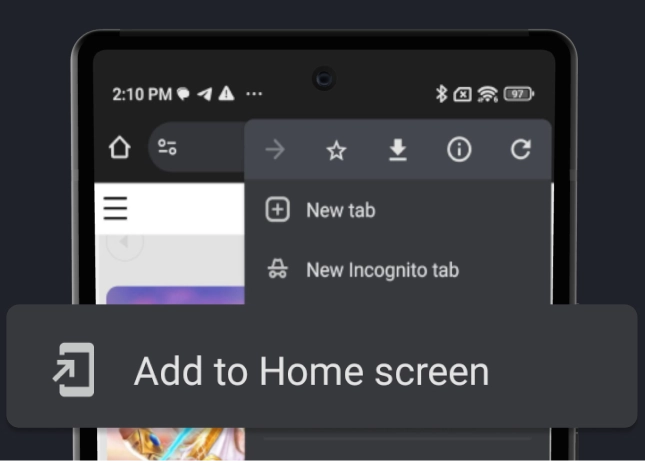
  3. Open the Chrome menu

    Tap the three-dot menu in the top-right corner of Chrome.

  4. Add to Home screen

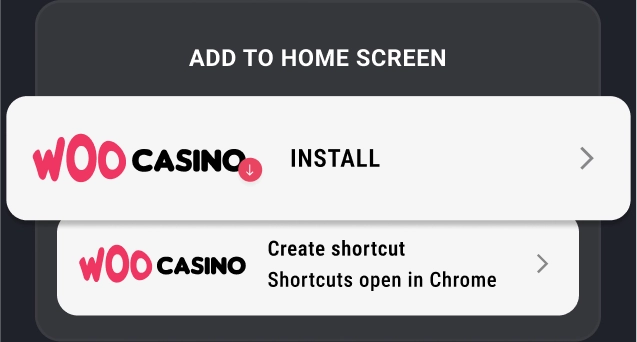
    Select "Add to Home screen" or "Install app" (the exact wording depends on Chrome version).

  5. Confirm

    Confirm the installation when prompted.

The WooCasino icon will appear on your home screen. Opening it launches the casino in a standalone window β€” no browser address bar, no tabs. The experience is visually cleaner than accessing the site through a standard browser tab.

After completing the installation, 10 free spins are credited to your account automatically. No code is required.

Installing the WooCasino PWA from the Chrome menu on Android
Step 3–4: Chrome menu β†’ Install app
WooCasino app icon on the Android home screen
The installed WooCasino icon on the home screen

How to Access WooCasino on iPhone and iPad

Apple's platform does not support PWA installations in the same way Chrome on Android does. That is a platform limitation, not a WooCasino-specific one.

The recommended approach for iOS users is to open woocasino.com in Safari, then use the Share button and tap "Add to Home Screen". This creates a shortcut that opens the casino in a full-screen Safari view β€” it looks similar to an app but technically remains a browser session.

Performance in Safari is generally smooth. The game library, lobby navigation, and account functions all work without meaningful restriction. Players who primarily use Firefox or Chrome on iPhone should switch to Safari for the best experience, as Apple requires all iOS browsers to use the same rendering engine underneath.

WooCasino App Bonus β€” 10 Free Spins on Install

WooCasino app install bonus

10 free spins, no promo code

Installing the WooCasino app on Android earns 10 free spins, credited automatically once the installation is confirmed. No promo code is needed.

This is a small reward β€” 10 spins do not go far β€” but it represents the only way to receive any free spins without making a deposit. For new players who want to try the mobile platform before committing, the install bonus provides a low-friction starting point.

The free spins are applied to a designated game. Terms apply, including wagering requirements. Checking the current terms at the time of installation is advisable, as the designated game and specific conditions can change.

Mobile Game Selection

The full game library is accessible on mobile. That includes:

Slots

The largest category, with titles from Pragmatic Play, Hacksaw Gaming, Nolimit City, Play'n GO, BGaming, Yggdrasil, NetEnt, and others. New releases appear regularly. The lobby is filterable by provider, which makes finding specific titles faster than scrolling.

Live Casino

Evolution Gaming tables load well on mobile, including game shows like Crazy Time and Monopoly Live. Live blackjack and roulette run smoothly over a stable connection. A slower mobile connection can affect streaming quality, so a WiFi or strong LTE signal makes a noticeable difference.

Table Games

RNG versions of blackjack, roulette, baccarat, and video poker are available. These are lighter than live streams and load quickly.

Sportsbook

The integrated sports betting section is accessible from the same mobile account. Navigation between the casino and sportsbook does not require re-authentication.

Performance and User Experience

The mobile site loads at a reasonable speed for a platform of this size. Navigation is designed for touch β€” tap targets are appropriately sized, and the lobby does not feel like a compressed desktop layout. The header collapses cleanly on smaller screens, and the main menu is accessible via a hamburger icon.

One consideration: slots from some providers include animated intros or high-resolution assets that increase load time on slower connections. Most games include a reduced-quality or low-data option in their settings, which helps on mobile data. For live casino games, a stable connection is more important β€” streaming quality degrades noticeably on a congested mobile network, and table games with time-limited betting rounds can become frustrating on a lagging feed.

Account management β€” deposits, withdrawals, bonus activation, verification document upload, limit-setting β€” all function through the mobile interface without needing to switch to desktop. The deposit flow, in particular, is clean: selecting a payment method, entering an amount, and confirming takes under a minute for Interac or crypto. Withdrawals follow the same flow.

Managing Your Account on Mobile

One area where the WooCasino mobile experience holds up well is account administration. Players who want to avoid using a desktop at all can handle the full account lifecycle from a smartphone.

Verification uploads work through the mobile browser β€” photograph your ID and proof of address, then submit through the account section. The camera integration in Safari and Chrome makes this straightforward on modern phones. Approval times after submission depend on the volume of pending verifications, but the mobile submission process itself is not more complicated than the desktop equivalent.

Setting responsible gambling limits β€” daily deposit caps, weekly wagering limits, session time reminders, cooling-off periods β€” is accessible from the account settings menu on mobile. These tools are worth knowing about before they become urgent; setting a deposit limit proactively is significantly easier than attempting to extend one mid-session.

Bonus activation also works on mobile. The promo code entry field appears during the deposit flow, so welcome stage codes (WOO, WOLF, GAMBLE, DIAMOND) can be claimed without a desktop. The same applies to the Weekend Reload and any other active promotions.

WooCasino Mobile vs. a Native App

Players accustomed to native apps from other platforms sometimes ask whether the PWA experience is comparable. It depends on what matters most.

A native app typically offers faster initial load, better push notification support, and tighter integration with the device's operating system. The tradeoff is a longer approval and update cycle β€” anything that changes in the casino's platform needs to go through an app store review, which creates lag between a web update and what the user sees.

The PWA approach means WooCasino can push updates immediately. The initial install is slightly more involved than tapping "Get" in an app store, but it is a one-time step. After that, the experience β€” full-screen interface, home screen icon, smooth navigation β€” is functionally similar to a native app for most day-to-day use. Performance differences are minor on current mid-range Android phones.

For iPhone users, the gap is wider: iOS restricts PWA capabilities more heavily than Android, and the "installed" Safari shortcut does not behave identically to a true app. For regular mobile casino use on iOS, the browser-based experience is the realistic baseline.


WooCasino App β€” FAQ

Does WooCasino have an app for iPhone?
Not a formal App Store app. iOS users access the full casino through Safari, and can add a home screen shortcut for a near-app experience.
Is there a WooCasino Android download?
Not through Google Play. The Android app is a PWA installed directly from the browser β€” go to woocasino.com in Chrome and use the "Add to Home Screen" option.
Do I get a bonus for downloading the WooCasino app?
Yes. Android users who install the PWA receive 10 free spins automatically, with no promo code required.
Are all games available on mobile?
Yes. The full catalogue β€” slots, live casino, table games, and sportsbook β€” is accessible on mobile.
Does the mobile version require a separate account?
No. The same account works across desktop and mobile.
Is the WooCasino mobile site safe to use on public WiFi?
The platform uses SSL encryption. As a general practice, using a trusted private connection for financial transactions is preferable over public WiFi regardless of the site.

Install WooCasino and Get 10 Free Spins

Add the PWA to your Android home screen β€” the spins are credited automatically, no code needed.

Open WooCasino
Up to CA$3,500 + 200 Free Spins